Blazor UI Communication with .NET Community Toolkit
There are multiple ways to facilitate communication between components in Blazor. Chris Sainty has a great post here that explains a few ways. Recently, Microsoft released version 8 of the .NET Community Toolkit library which includes an IMessenger interface that can be used to…exchange messages. There are a couple of other Blazor libraries that do something similar (Blazor.EventAggregator and BlazorComponentBus). The Community Toolkit is supported by Microsoft and has been highly optimized according to this article.
You can utilize this interface to send and receive messages between various Blazor components. Below I have a simple example that shows this. You can view the code via GitHub here.
Create
Create a new Blazor Server App Empty project. You can use this in Blazor WebAssembly as well, but I’ll be using Blazor Server for this example.
Configure
- Install the CommunityToolkit.Mvvm package
- Modify
Program.cswithbuilder.Services.AddScoped<IMessenger, WeakReferenceMessenger>();
This uses the WeakReferenceMessenger which does not require manually unregistering recipients. Registering with a Scoped lifetime is useful for Blazor Server so that state is not shared between users and separate browser windows/tabs.
- Add the following to _Imports.razor:
@using CommunityToolkit.Mvvm.Messaging;
Index.razor
The Index.Razor component is below. This component sends the CountModifiedMessage which will be handled by any components registered for it.
The steps here are:
- Add a
Countproperty - Add a button to increment the
Countstate - Create the
IncrementCountmethod - Increment
Count - Add
@inject IMessenger _messenger - Add
_messenger.Send(new CountModifiedMessage { Count = Count });toIncrementCount - Create
CountModifiedMessage.cswith anintpropertyCount. This can be created outside of theIndex.razorcomponent to be referenced by other components.
@page "/"

<Header></Header>
<h3>Index</h3>
<button @onclick="IncrementCount">Increment Count</button>
@Count

@inject IMessenger _messenger

@code {
    public int Count { get; set; }

    public void IncrementCount()
    {
        Count++;
        _messenger.Send(new CountModifiedMessage { Count = Count });
    }
}
Header.razor
The Header.razor component is below. This component registers a handler for the CountModifiedMessage.
The steps here are:
- Add a
Countproperty - Add
@inject IMessenger _messenger - Register a recipient/hander for the
CountModifiedMessagemessage inOnInitialized_messenger.Register<CountModifiedMessage>(this, (_, m) => CountModifiedHandler(m)); - Create the handler method
CountModifiedHandler - Set
Countto theCountModifiedMessage.Countproperty and callStateHasChanged() - Add this component to
Index.razor
<h3>Header</h3>

@Count

@inject IMessenger _messenger

@code {
    public int Count { get; set; }

    protected override void OnInitialized()
    {
        _messenger.Register<CountModifiedMessage>(this, (_, m) => CountModifiedHandler(m));
    }

    private void CountModifiedHandler(CountModifiedMessage message)
    {
        Count = message.Count;
        StateHasChanged();
    }
}
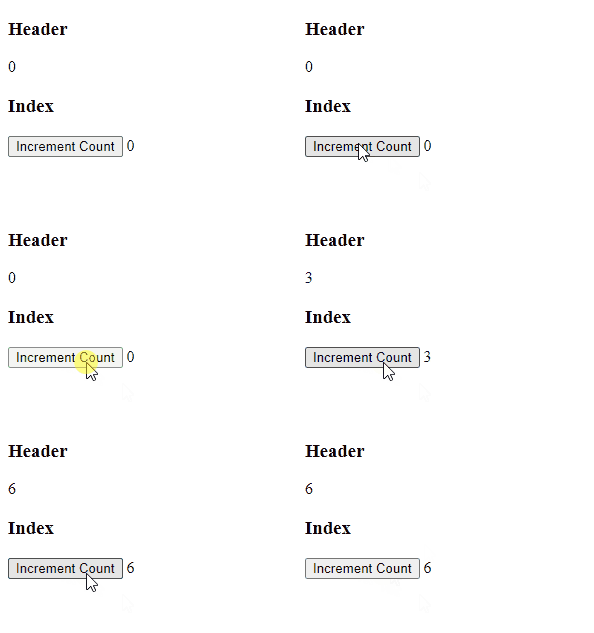
Demo